Sunday, 9:47 PM.
Your Grade 7 piano student just uploaded the Chopin nocturne she's been working on. You play it back at 0.75×, drop a pinned comment at 0:42 about the left-hand voicing, hit Approve, and put the kettle on. Three minutes, done.
Built for private music teachers
Schedule lessons, review practice recordings with timestamped feedback, and send invoices that get paid — all from a single, focused app.
Sunday, 9:47 PM.
Your Grade 7 piano student just uploaded the Chopin nocturne she's been working on. You play it back at 0.75×, drop a pinned comment at 0:42 about the left-hand voicing, hit Approve, and put the kettle on. Three minutes, done.
Monday morning.
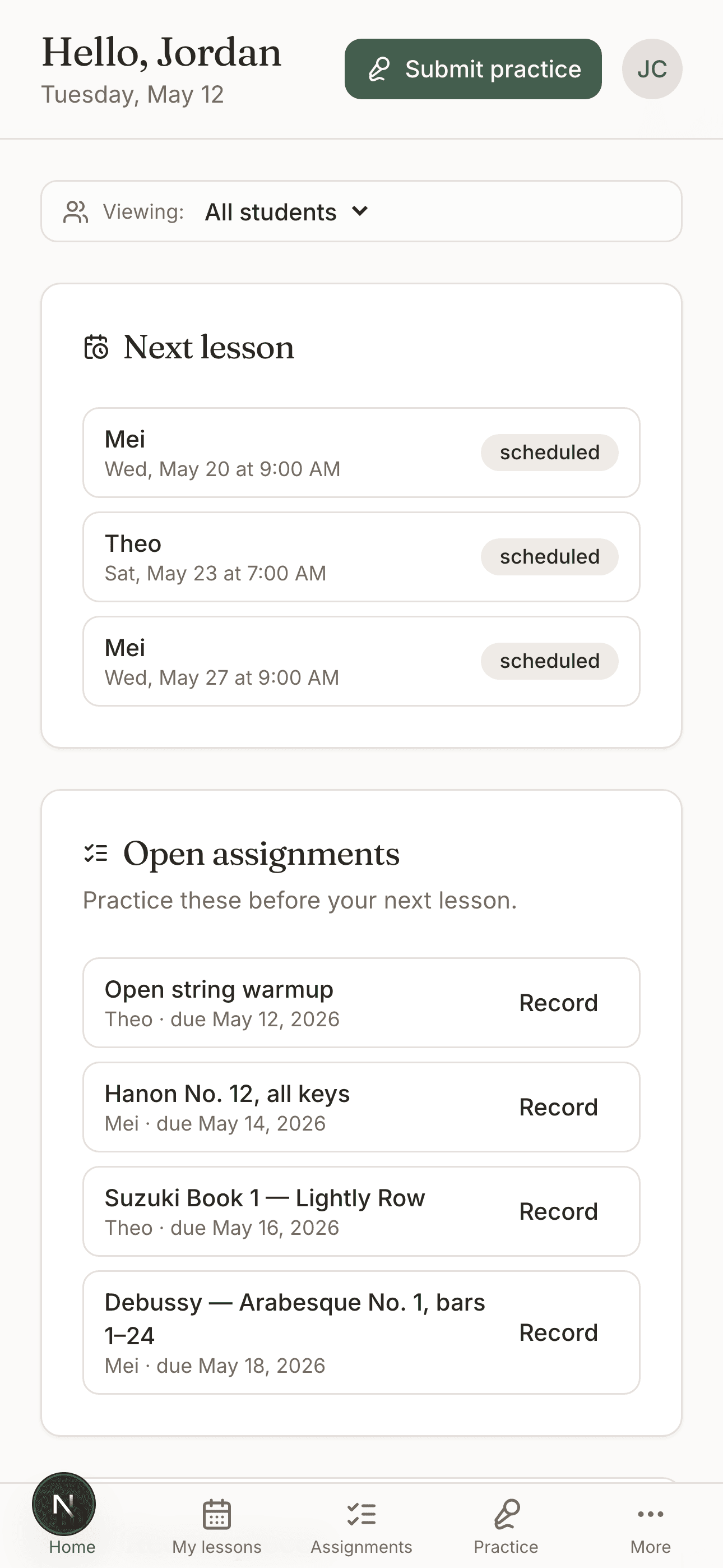
Eight lessons today. You open your phone — the schedule shows every student, lesson type, and any notes from last week. No double-bookings because the app caught the conflict when you tried to add a make-up at 4 PM.
First week of the month.
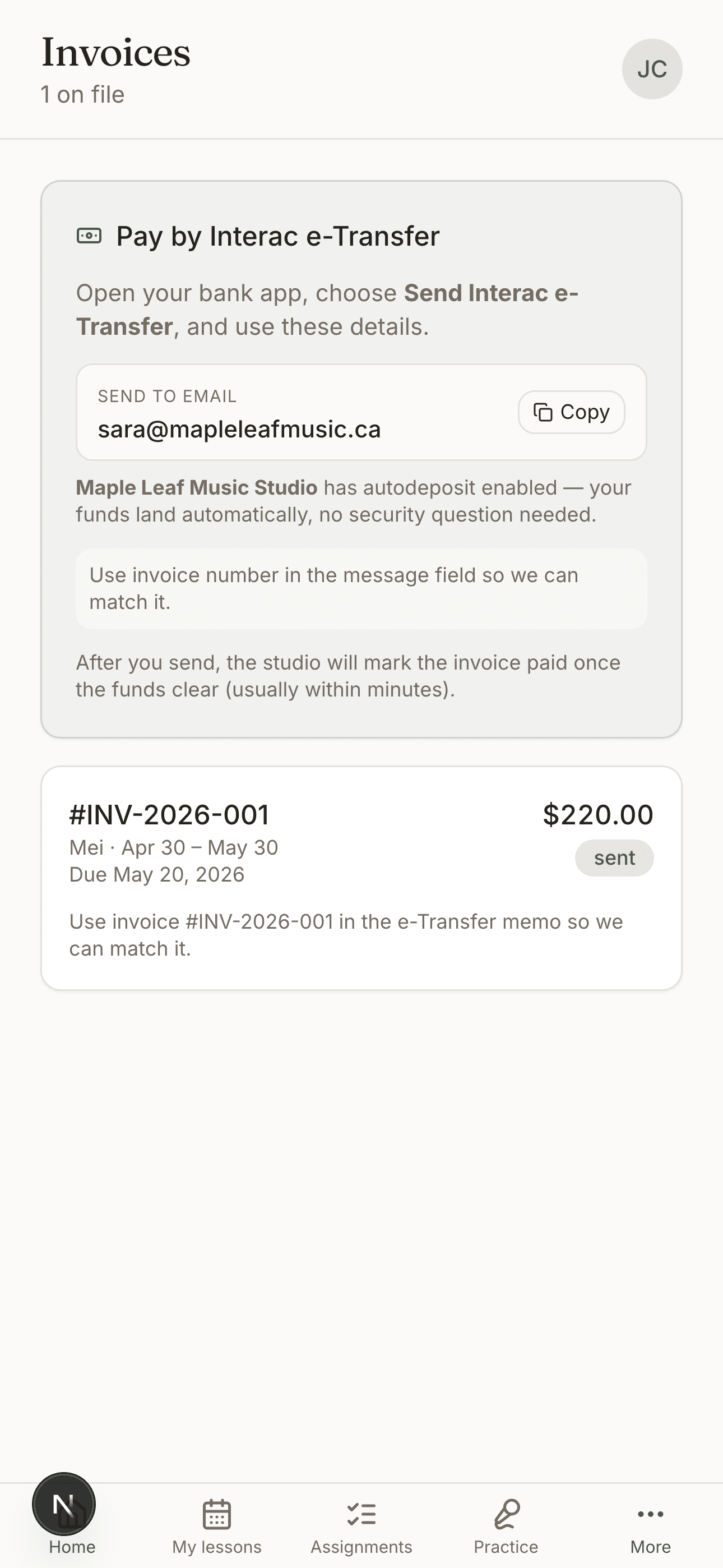
Invoices go out automatically with a Stripe link for the families who pay by card, an Interac email for the Canadian ones, and a plain HTML invoice for everyone else. No spreadsheet. No reminders to send. No "did I get the e-Transfer?" feeling.
Honest side-by-side. We didn't try to be every studio app for every studio — we tried to be the best one for solo private teachers.
| A spreadsheet | My Music Staff | Note / Key | |
|---|---|---|---|
| Practice recordings with timestamped feedback | — | Not really | Built-in, 0.5×–2× playback, pin moments |
| Lesson scheduling + conflict detection | You do it | Yes | Month-grid + Google Calendar 2-way sync |
| Family-side app (student uploads, parent sees notes) | — | Web portal | Native iOS app + web — one shared login |
| Get paid (cards + bank transfer + email invoices) | Manual chase | Cards via Stripe | Cards (Stripe) + Interac + email invoice anywhere |
| Setup time before you can teach your first lesson | Hours | 30–60 min | Under 5 minutes |
Four jobs, done well — instead of forty mediocre ones.
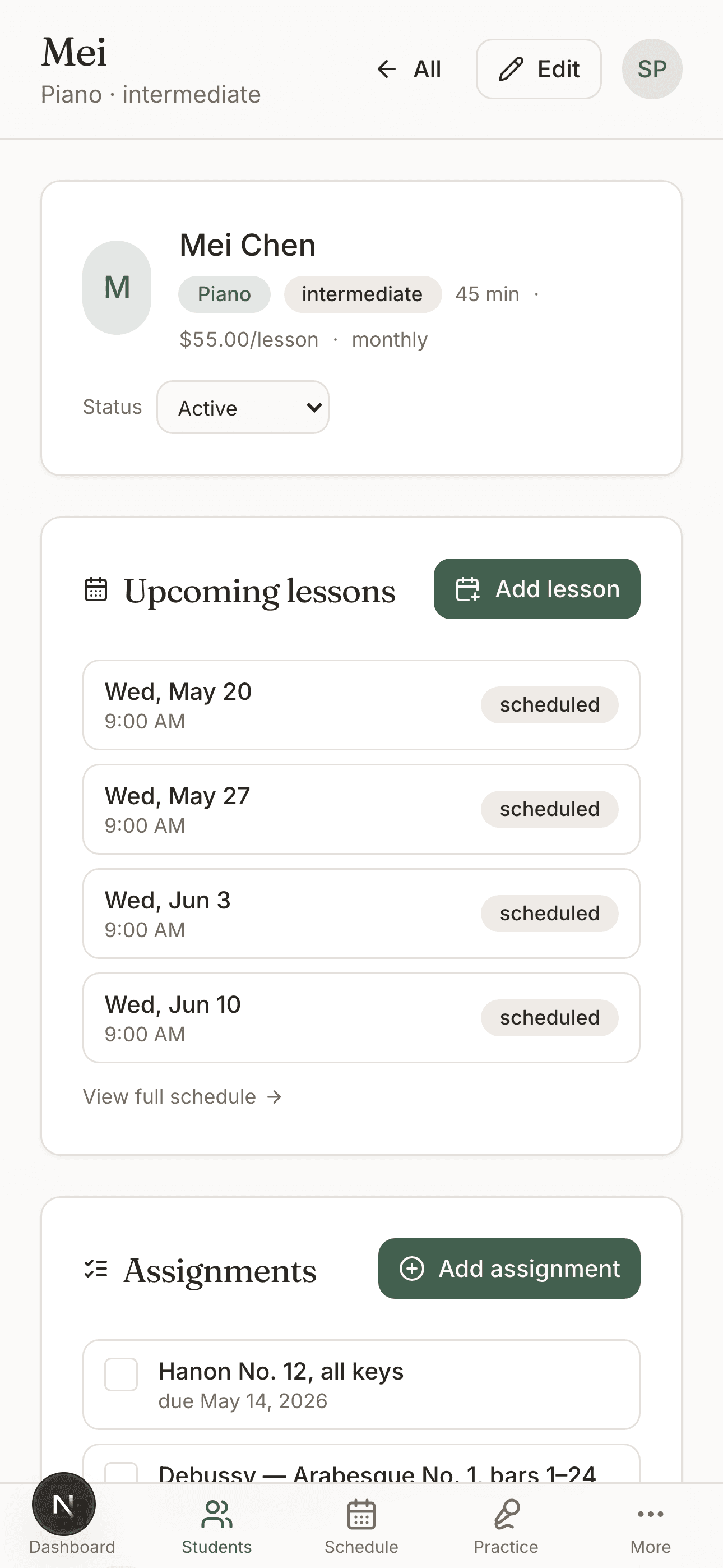
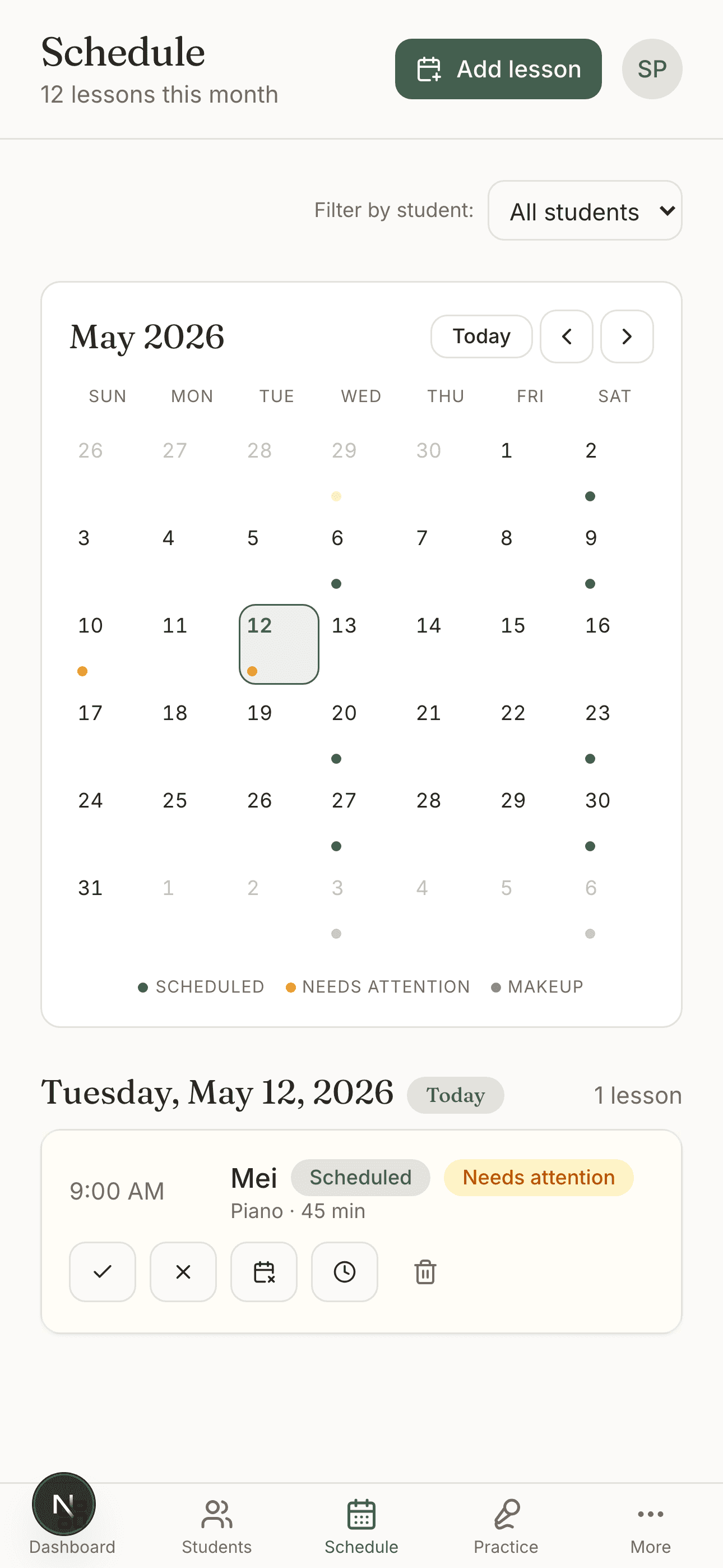
A real month-grid calendar with dots for lesson counts per day. Tap a day to drill in. Drag a lesson to reschedule. Conflict detection so you never double-book a 4 PM.
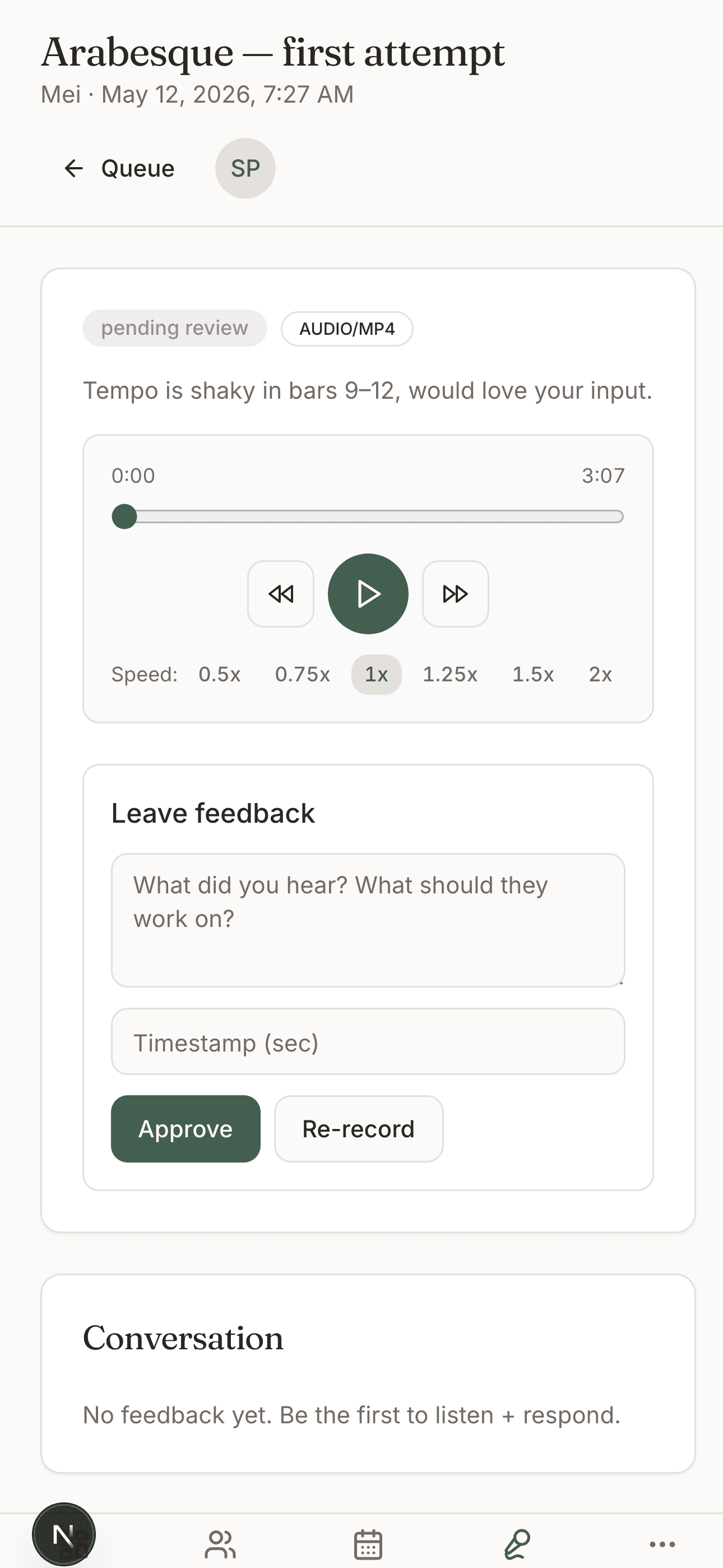
Native iOS recording (not a web hack). 0.5×–2× variable playback. Pin a comment at 0:22 — "the bow bounces here, try more weight in the index finger." Practice feedback that actually lands.
One-tap Stripe card link, Interac e-Transfer for Canada, or a clean HTML email invoice for anywhere else. Mark paid by hand if the family hands you cash at the lesson. No spreadsheet.
Parents and kids share one household login. They see upcoming lessons, open assignments, and your feedback — without juggling logins. Sibling discounts on invoices. Multi-instrument profiles.
Teachers and families log into the same app — different views for who's looking.
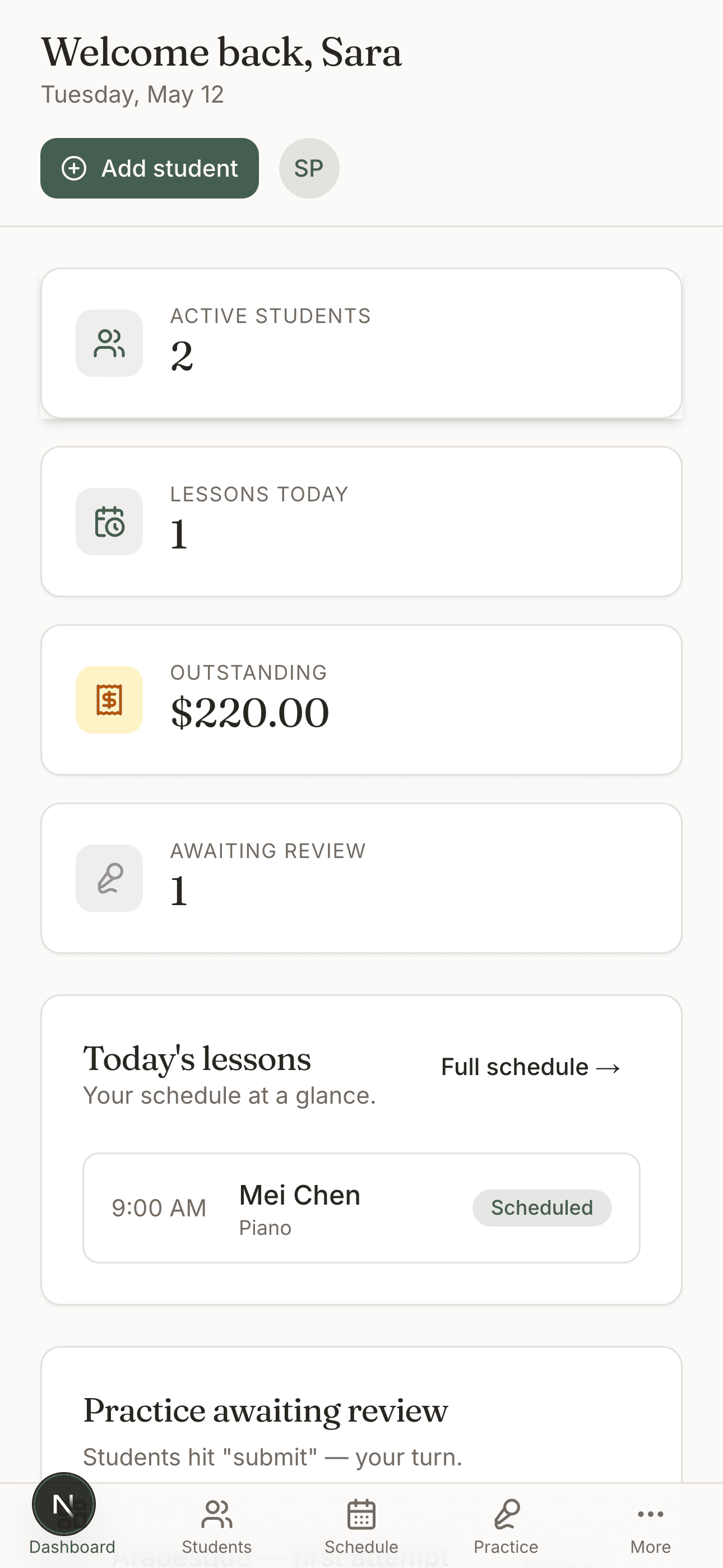
Teacher side
Daily dashboard, every student's history, and a real calendar. The most calming admin surface you've used.
Practice review
No one else does this well. Audio uploads from the family, variable-speed playback, comments pinned to the moment — and the kid sees them before the next lesson.
Family side
A separate, kid-friendly view of upcoming lessons + open assignments. Submit a recording in two taps. Read teacher feedback right after dinner.
Worldwide
Connect your Stripe account in two minutes — families in ~46 countries can pay by card, and the money lands in your bank, not ours. For Canadians, Interac e-Transfer is built in from day one. For everywhere else, we email a clean HTML invoice with whatever payment instructions you set up.
We don't take a cut of your lesson fees. The only thing we charge for is the Pro plan.
STRIPE
USD / CAD / GBP / EUR / AUD / NZD / SGD / JPY / ~38 more. Stripe's standard 2.9% + 30¢; we don't add a platform fee.
INTERAC
Built-in flow for Canadian teachers. Families pay to your e-Transfer email; we generate the invoice + tracking.
PDF invoice in an email with whatever payment instructions you set up. Mark paid in one tap when the cash lands.
We tested this with 100 teachers. The median onboarding time is under 5 minutes.
Free, one form, no credit card. You're a teacher with one student. That's the free plan.
Family clicks the link from their email, sets a password, sees their kid's profile. They can submit practice that night.
Two-way Google Calendar sync imports your existing schedule in one tap. Connect Stripe in two minutes to take card payments. Or skip both and stay on the manual flow.
Free covers the first student so you can try us with a real kid. Pro is what every teacher with more than one student will pay.
Free
Enough to actually use, not just to try.
Pro
Saves 36% on annual. Cancel anytime in your app store.
Yes. One student forever, no credit card. That's enough to onboard a real new student and decide whether you want to move the rest of your studio over. Pro kicks in only when you add a second student.
Your student opens the app, taps Submit Practice, records on their phone (native iOS recording via our custom Capacitor plugin — not a Web Audio hack), and submits. You get a notification. You play it back at any speed from 0.5× to 2×, tap Pin to time-stamp a comment, type your note, hit Approve or Re-record. The student sees your feedback the next time they open the app.
No. Stripe takes their standard 2.9% + 30¢ on card payments — we don't add anything on top. Interac e-Transfer is free both ways. We make money only from the Pro subscription.
That's most of the world, actually. We support Interac e-Transfer (the standard in Canada), and for anywhere else, we email a clean HTML invoice with whatever payment instructions you set up — your bank details, a Wise / Revolut link, cash-at-the-next-lesson, whatever. Mark the invoice paid in one tap when the money lands.
The web app works perfectly on Android (and we built it mobile-first). A dedicated Android app is coming, but most teachers use Android families through the web — there's no functional gap.
MMS is mature and great for academies (30+ students, multiple teachers). We're focused on solo private teachers with 1–30 students. Our killer feature is audio practice review with timestamped feedback — no other studio-mgmt app does this well. Our UI is also a generation newer.
Start with one student. Free, forever, no card. If it doesn't make your studio feel calmer in 30 days, walk away with everything you put in (data export is one tap).
Questions? Email support@noteandkey.app. A human reads every one.